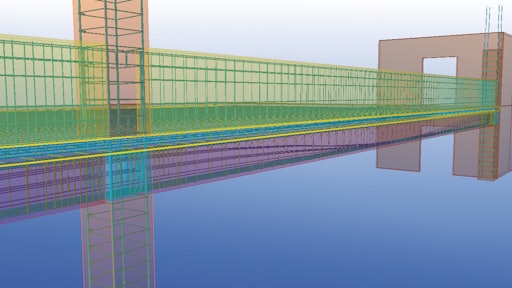
Building Information Modeling (BIM) is a phrase currently being thrown around the construction industry a lot. You might have heard it, but you might not know what it means. Simply put, BIM is a software program that offers a 3D version of a project - a virtual picture of what a building will look like before an excavator digs its first bucket of dirt. Taking a step beyond that simple definition, you'll find BIM is so much more.
The grand idea behind BIM is to achieve one construction document that everyone can work from, including the architects and engineers, the owner, the general contractor, and the various concrete, HVAC, electrical and other subcontractors working on the project. This one document can replace the several sets of building plans a concrete contractor often has to deal with on a job.
There are currently a number of BIM software programs on the market, including Revit Structures, VICO Constructor, Bentley Structures and Tekla Structures. Most of the programs can work in conjunction with each other. For example, a contractor using Tekla Structures can import information from an architect's Revit files and work off that plan.
Find problems before you start building
Aaron Stegmeier is president of A.R. Stegmeier Enterprises, Inc. in Lakewood, Wash. His company primarily works as the structural concrete subcontractor on a variety of commercial projects. Stegmeier started using AutoCAD, which creates 2D building plans, more than 10 years ago. Last year he started seeing things in 3D when he began using Tekla Structures. Stegmeier has used Tekla on five projects since then.
He says the biggest benefit he's seen with BIM is its ability to catch discrepancies when the architect's model and structural engineer's plans don't match up. "If I get on the jobsite and start rolling along with 2D prints and hit conflicts on the job, I have to go through the RFI (request for information) process, and that is a waiting game that costs a lot of frustration and money," Stegmeier says. "With BIM modeling I can draw a model of the concrete ahead of time and put all the architectural and structural information in, and I can see the clash points two or three months ahead of time and deal with them then."
One instance of a clash Stegmeier found preconstruction on a project recently concerned the way his concrete work interacted with the structural steel. "Our embeds for the steel contractor were drawn outside our concrete wall, and no one knew it from the 2D plans," Stegmeier explains. "So when I showed it to the designer in 3D he was able to tell me I needed to change the concrete."
Andy Lock is chief estimator with F.A. Wilhelm Construction Co., Inc. out of Indianapolis, Ind. The company performs work as a concrete trade contractor and also self-performs concrete on projects where they act as the general contractor. Lock says Wilhelm has expertise in large and complex concrete projects. Two years ago, Lock's office began its transition from 2D systems into the 3D BIM world. Lock sees many benefits of the BIM programs over the 2D systems, one of which is having the opportunity to walk through multiple scenarios about how you might build a project, how long it might take or how much equipment you'll need.
"You can see how your resources might flow from location to location. Many projects require multiple crews starting in different areas, resulting in a wide range of outcomes," Lock explains. "With BIM you can reduce the time and effort required to analyze multiple scenarios. Finding the best scenario is a critical component of improving work flows and productivity."
A database of information
BIM's ability to create a 3D model of a project before it's built is only one beneficial element of the programs. BIM modeling can take the project into 4D with the addition of time and scheduling and 5D with the addition of cost. It becomes a central location for all information about a project.
"BIM programs create both a 3D model and a project database," Lock says. "Traditionally, we have drawn lines, planes, vectors and text to define objects. In the BIM world we draw objects. Objects can be joined together and store information. This information can be spatial information such as length, height, width and volume, and it can be information such as important dates, materials, specifications, piece marks, cost, RFI data, or any other information the user desires. We're reducing potential for errors and coordination issues, saving time and communicating things visually and instantly."
Wilhelm has worked with a number of BIM tools, integrating programs such as Revit, Tekla, and VICO. Lock says some programs seem to be more focused on architectural design and realistic renderings, whereas Tekla is more focused on structural components and can be used as a buildable model.
BIM software can help with scheduling and fabrication, allowing a contractor to review a model and see a virtual representation of a project's status. 4D simulations can show what a project will look like on a given date if work is performed as planned. "This is especially important when so many projects rely on just-in-time fabrication and delivery," Lock explains. "Contractors are being offered very powerful tools to coordinate and synchronize schedules in new ways. Ways that have the potential to reduce costly delays."
Lock sees a lot of potential for BIM systems, and is convinced it's where the industry is heading. His company has run into projects already where BIM modeling is a project requirement, and he sees BIM going beyond the building stages to offer a virtual building for the owner. "I see more and more information being stored in models. At the end of a project the owner could be given an 'as built' model that tells them exactly the components and materials used in their project and they could use it to maintain their building from there on," he explains.
Learning curve
At first glance, a BIM model might look complex, but contractors say it's easier to start working in a 3D system than a 2D system.
"I think BIM programs work the way most people think," Lock says. "An example I was given in the beginning was this: In 2D programs you draw footings by drawing lines to make an outline of one; with BIM programs you draw a footing by creating an object in your model called a footing and defining its properties, such as height, length, width and concrete type.
"BIM software allows for the creation of very detailed and complex models that can contain thousands of objects. It's the combination of all of the objects that makes the models complex, not the individual objects themselves. Most of the individual objects are relatively easy to create." Lock continues, "As a person begins to understand this, the process of making models becomes much easier for them."
Software providers offer extensive training on their programs, including online webinars and videos. The AGC also offers BIMForum.org, an online community dedicated to the sharing of BIM information.
Stegmeier and Lock agree that one of the biggest problems contractors face when working with BIM is finding architects and engineers who are willing to share their drawing files for import into their BIM programs. But as the technology becomes more prevalent and project teams see the benefits of BIM for everyone in the building cycle, the construction industry will realize the true value of these programs.