As reviewed by CPA Practice Advisor in March 2012
FOUNDATION Software - FOUNDATION for Windows
From the March 2012 Review of Construction & Contractor Accounting Systems.
Best Fit: FOUNDATION for Windows contains a full menu of features designed specifically for construction related businesses. While small construction companies with under $1 million in revenues may not need Foundation, just about any mid-to large construction company or contracting firm will find this product useful.
Product Strengths:
- Easy to navigate, uncluttered user interface
- Excellent scheduling and service dispatch modules
- Terrific selection of add-on modules
- Solid import/export/integration capabilities
Potential Weaknesses:
- Greater initial investment may make it beyond the reach of companies with under $1 million in revenue.
- The powerful features may require a greater learning curve than off-the-shelf software
FOUNDATION Software has been in business since 1985. Foundation's original product was DOS-based. In the early 2000s it rewrote the software in a Windows environment. Featuring a Microsoft SQL database, FOUNDATION continually enhances its product for its core customer base, which includes construction trade businesses of all sizes.
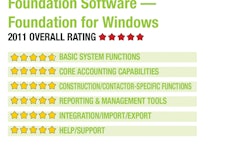
Basic System Functions - 5 Stars
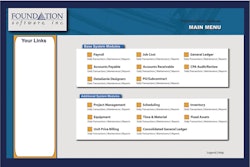
FOUNDATION for Windows offers users a graphical menu that contains four major sections; Base Modules, Additional Modules, Project Control, and Tools. Easy to navigate, FOUNDATION has a drop-down menu bar at the top of the screen for quick system access. Users can choose to use the default screen or customize the interface to suit their needs, adding frequently used program functions, reports and external links for quick access via QuickLinks. Foundation's data entry screens are well-designed and contain all the necessary look-up options.
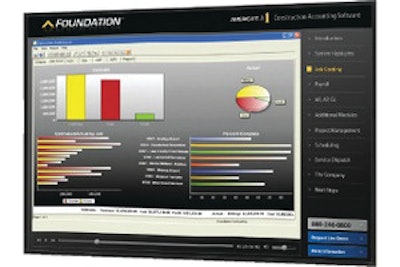
The FOUNDATION Wizard allows users to create a series of steps attached to each activity, with those same steps available each time that activity is completed. Numerous user-defined screens are found throughout the product, making it easy to track the detail needed. FOUNDATION also contains excellent dashboard reporting functionality, with dashboards available in a variety of categories including GL, AR, AP, Job Cost, and Change Order modules. All dashboard reports contain drill-down capability.
FOUNDATION is easily accessed from remote locations using FOUNDATION SaaS, an online or "cloud" deployment option of its accounting software. It also offers a web-based application for mobile devices (iPads, tablets, smartphones, netbooks, etc.) that is used with FOUNDATION called FOUNDATION mobile. FOUNDATION mobile makes it easy for field employees to enter timecards and related information. FOUNDATION runs on Windows 7 Professional, Vista Business and XP Professional, and will run on either 32- or 64-bit versions of the operating systems listed above.
Core Accounting Capabilities - 5 Stars
FOUNDATION offers users excellent accounting and financial capability. The GL allows users to post transactions into both prior and future periods; it is a fully date-sensitive system. GL accounts are user-definable, and each account can be divided into four subdivisions for more in-depth tracking. FOUNDATION supports multiple companies and users which can be consolidated for more accurate reporting.
The AP module offers users simplified data entry options with data automatically populating data fields. Recurring invoices can be set up in FOUNDATION and vendor payment selection is flexible, with users able to produce positive pay. The AR module offers users multiple invoicing options including Time & Materials Billing and Unit Price Billing. Recurring billings can be set up, and users can also create custom invoices and custom customer statements.
AIA billings are also supported with the standard G702 and G703 built in. Foundation's Payroll module is designed for construction companies, easily handling Worker's Compensation detail, prevailing wage fringe calculations, and union specific functionality such as deductions, multi-pay rates and various other union requirements. The FOUNDATION payroll module also offers certified payroll reports.
Foundation's core construction system includes GL, AP, AR, Payroll, Purchase Order, Job Costing, DataGenie Report Designer and CPA Audit/Review Console. An excellent audit trail is built into every module, with all transactions receiving a unique code when posted. System security is multi-level, with users assigned a specific company (or companies) with security assigned per module and per feature in each module.
Construction/Contractor-Specific Features - 5 Stars
Users can enter and track estimates for quantities, units or dollar amounts and can easily track estimated versus actual dollars for each job in the system. Users can also update existing estimates as the job progresses. Users can easily keep track of historical data, making it easy to more accurately estimate future jobs. FOUNDATION also integrates with various third-party industry-specific estimating programs.
Foundation's optional Project Management module has been completely revamped, now allowing owners and project managers to easily access all job related documents such as RFP's, transmittals, field logs and change orders from a single location called the job center. Users can track all change orders, with the ability to easily assign a category to each change order.
All customer, vendor, employee, and subcontractor data is easily managed in FOUNDATION, with subcontractor data tracked in the Purchase Order module where users can also manage vital information such as certificates of insurance, insurance expiration dates and workers compensation detail. The Document Imaging and Routing module provides users with the ability to manage all documents and graphic files related to a job, like job pictures, and allow users to route invoices to the appropriate personnel for approval.
The Inventory module supports an unlimited number of items, multiple pricing levels and varying options for unit measure. The Purchase Order/Subcontract module can track spending levels for products purchased, and users can choose to enter an abbreviated version of the P.O. or add detail as needed. FOUNDATION for Windows offers an excellent Service Dispatch module which uses a user-defined color coded dispatch board, making call scheduling, progress and completion tracking easy. Company dispatchers can easily send messages to field technicians using text messaging, and the module also tracks associated items such as equipment warranties, equipment maintenance detail, and can manage all active service contracts.
Reporting & Management Tools - 5 Stars
FOUNDATION for Windows contains excellent reporting options, offering hundreds of standard reports. Excellent Job Cost reporting options include the Job History detail, where users can view all data for the specific job(s) at the transaction level, and the Work in Progress report, which is vital for project managers who wish to keep on schedule and under budget. Bonding and Work in Progress reports offers users detail such as Total Cost, Prior Profit, Current Billings and Prior Billings.
The Over/Under Billing provides an in-depth look at budget details for each job, allowing project managers to see what jobs are over billed and what jobs are under billed. AIA invoicing is also available in Foundation and can be completed on standard forms. The optional executive dashboards offer users an excellent selection of reports in Job Cost, GL, AP, AR, and Change Order modules. The Genie Series report writers provides users with custom form and reporting options and the ability to create templates for future use. Foundation's Document Imaging and Routing module allows users to route invoices to managers for approval and attach all related documents to one central file. The SaaS deployment option allows easy access, with all remote and field employees able to access the system wherever they are.
Integration/Import/Export - 5 Stars
Both import and export Genies are available to assist users in transferring data to and from third-party applications. Other data such as purchase order, employee time and estimating information can be imported into FOUNDATION as well. FOUNDATION easily integrates with all Microsoft Office products such as Excel, Word and Access. Outlook integration also allows users to save emails and attachments directly to each project or job. Add-on modules such as Project Management, Scheduling, Service Dispatch, Equipment, Time & Material , Inventory, Fixed Assets, Unit Price Billing, Executive Dashboard, Document Imaging & Routing, and Consolidated General Ledger easily integrate with the core construction accounting modules.
Help/Support - 5 Stars
A built-in Help wizard is available in Foundation, and users can download all system updates directly from the FOUNDATION Software website. FOUNDATION also offers a variety of training options which include both onsite and online training. All system support is handled from Foundation's corporate offices in Ohio. The Maintenance program, included in the pricing, offers new users six months of toll-free telephone and email support.
Summary
FOUNDATION for Windows is really the most state of the art construction accounting product available on the market today. FOUNDATION has found a way to combine an amazing array of modules and features into an easily navigated system. Suitable for all but the smallest construction and contracting businesses, FOUNDATION currently starts at $7,000 for a single-user system.
2012 OVERALL RATING:5 Stars